Table of Contents
I run a bare metal k3s cluster (Winterfell) where the nodes are connected via a Tailscale mesh. For public-facing services, I use Cloudflare Tunnels, and that works great. But some services are internal-only, and for those I was typing Tailscale IPs and port numbers into my browser every time. 100.102.29.109:8080 for Dawarich, 100.102.29.109:9090 for Prometheus, and so on.
I wanted dawarich.internal.rajrajhans.com instead.
I’ve been down the /etc/hosts route before. It works on one machine. Then you pick up your phone and have to remember the IP again. Then your tablet. Then a different laptop. It doesn’t scale, and it’s annoying to maintain.
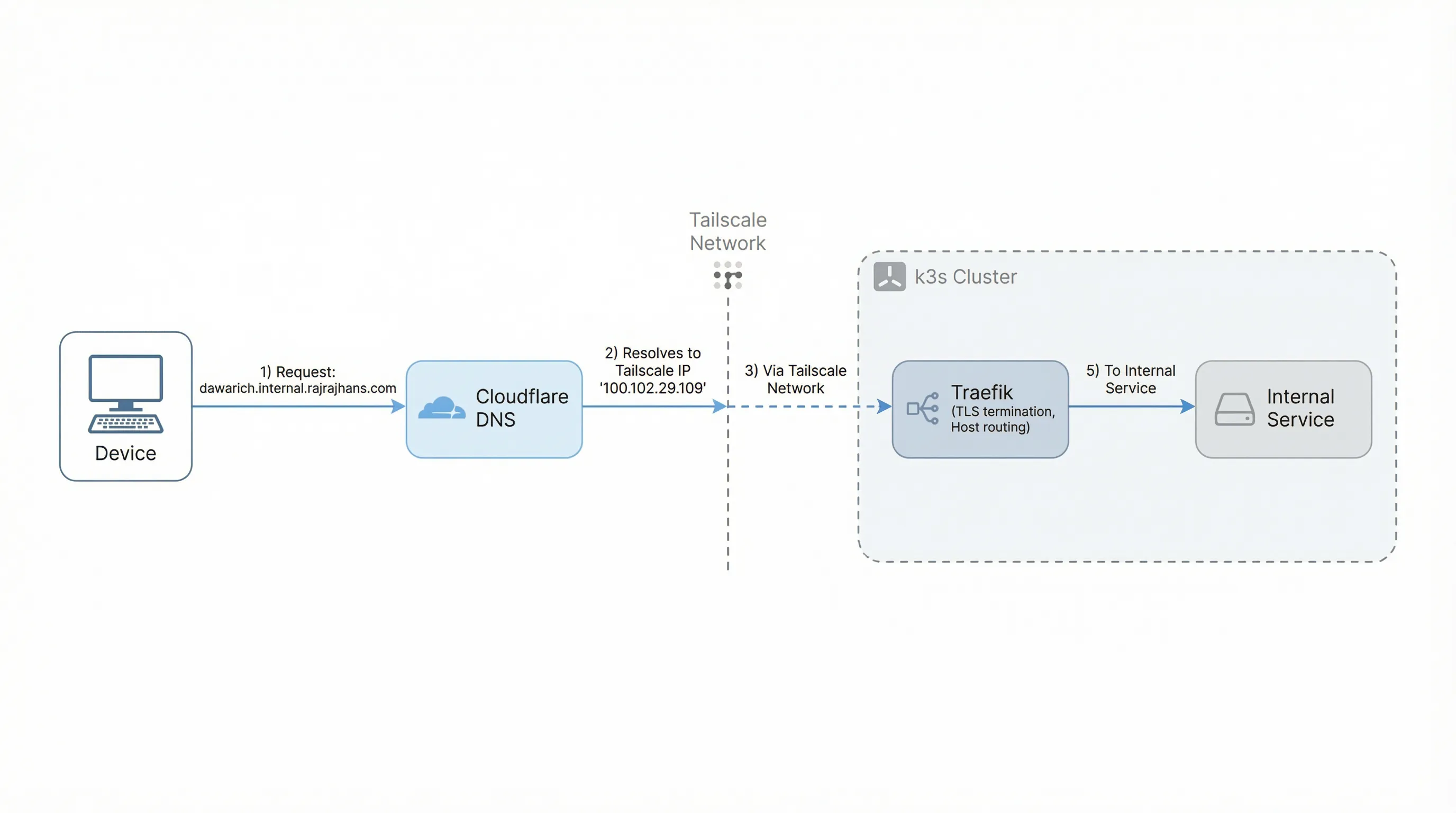
This post is my notes on how I set up internal DNS for my cluster. The solution is four layers working together: Tailscale as the network boundary, wildcard DNS via Cloudflare, wildcard TLS via cert-manager, and per-service routing via Traefik IngressRoutes.
Layer 1: Tailscale as the Network Boundary
Each node in the cluster has a stable Tailscale IP on my tailnet (e.g., 100.102.29.109). k3s ships with Traefik as the built-in ingress controller, and I’ve configured it to expose a LoadBalancer service bound to the node’s Tailscale IP on port 443.
The key thing here is that this LoadBalancer is only reachable from devices on my tailnet. If you’re not on the tailnet, the Tailscale IP means nothing to you. Tailscale itself is the network boundary, no extra firewall rules or VPN configs needed.
Layer 2: Wildcard DNS via Cloudflare
Now I need *.internal.rajrajhans.com to resolve to that Tailscale IP. I added a single DNS A record in Cloudflare:
*.internal.rajrajhans.com → 100.102.29.109Because it’s a wildcard, any subdomain I make up automatically resolves. dawarich.internal.rajrajhans.com, prometheus.internal.rajrajhans.com, anything.internal.rajrajhans.com. No per-service DNS config needed.
There’s one critical gotcha here: the DNS record must be DNS-only (the grey cloud in Cloudflare), not proxied through Cloudflare’s edge (the orange cloud). If you proxy it, Cloudflare returns one of its own edge IPs instead of the Tailscale IP, and the whole scheme breaks.
From the public internet, resolving dawarich.internal.rajrajhans.com gives you 100.102.29.109, which is a Tailscale IP that means nothing outside my tailnet. The connection just times out. From inside my tailnet, the same DNS resolution gives the same IP, but now it actually routes to my cluster’s LoadBalancer. The wildcard record pointing to a Tailscale IP is inherently private.
Layer 3: Wildcard TLS via cert-manager
I have DNS resolution working, but browsers will complain without a valid TLS certificate. I need a cert for *.internal.rajrajhans.com.
The usual way to get a Let’s Encrypt certificate is via HTTP-01 challenges, where Let’s Encrypt makes an HTTP request to your server to verify you control the domain. But my server isn’t publicly reachable. It’s behind Tailscale. The HTTP request from Let’s Encrypt would never arrive.
DNS-01 challenges solve this. With DNS-01, Let’s Encrypt asks you to prove domain ownership by creating a specific DNS TXT record. cert-manager automates this by talking to Cloudflare’s API to create and clean up the record. The verification happens entirely at the DNS level, so it doesn’t matter that the server itself is unreachable from the public internet.
I set up a cert-manager ClusterIssuer with Cloudflare DNS-01 solver credentials and a Certificate resource requesting *.internal.rajrajhans.com. cert-manager handles the initial issuance and automatic renewals. I configured this cert as Traefik’s default TLS certificate, so any IngressRoute that specifies tls: {} picks it up automatically.
Layer 4: Per-Service IngressRoutes
With the first three layers in place, adding a new internal service is just one Traefik IngressRoute manifest. Here’s the one for Dawarich:
apiVersion: traefik.io/v1alpha1
kind: IngressRoute
metadata:
  name: dawarich-tailnet-ingress
  namespace: dawarich
spec:
  entryPoints:
    - websecure
  tls: {}
  routes:
    - match: Host(`dawarich.internal.rajrajhans.com`)
      kind: Rule
      services:
        - name: dawarich
          port: 3000
That’s it. The tls: {} picks up the wildcard cert, the Host match routes requests for this subdomain to the right service and port. No cert config, no DNS config, no firewall rules per service.
I also have a catch-all IngressRoute on the web entrypoint (port 80) that applies a redirectScheme middleware to redirect HTTP to HTTPS. So if I accidentally type http://dawarich.internal.rajrajhans.com, it redirects to HTTPS automatically.
Wrapping Up
Let’s trace a request end to end. I type dawarich.internal.rajrajhans.com in my phone’s browser. DNS resolves it to 100.102.29.109 (the Tailscale IP). Because my phone is on the tailnet, the request reaches the Traefik LoadBalancer on port 443. Traefik matches the hostname, terminates TLS with the wildcard cert, and forwards the request to the Dawarich service on port 3000. All over a valid HTTPS connection with a friendly URL.
Adding a new internal service is one YAML file. The DNS, TLS, and network boundary are all shared infrastructure set up once. And this coexists cleanly with public services that still go through Cloudflare Tunnels.
That’s it for this post. If you’re running a similar setup, I hope this saves you some time. Thanks for reading!
References