Table of Contents
I’ve been on Tailscale for years for my personal homelab (the Winterfell k3s cluster, my self-hosted music, all of it sits on one tailnet). Recently, work adopted Tailscale too, which I was quite happy about. I’ve run my homelab on their free tier for years, so I’d been talking it up at work for a while, and it felt good when we signed up for a paid plan.
The catch: the Tailscale app keeps only one tailnet active at a time. I can add both accounts and flip between them, but the moment work is active my homelab is gone, and the other way around. I want both live at once, all day, on the same Macbook, without the constant flipping.
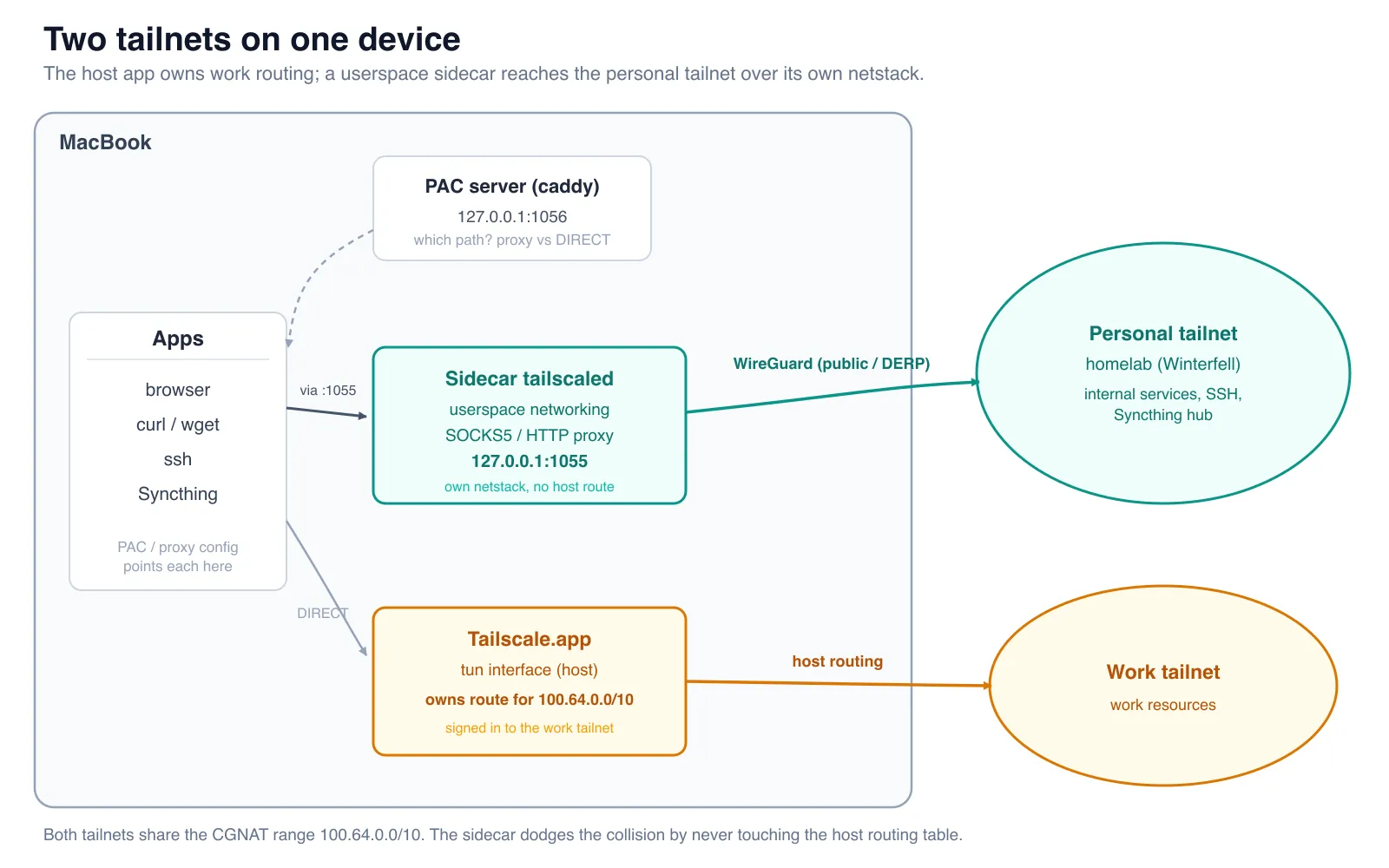
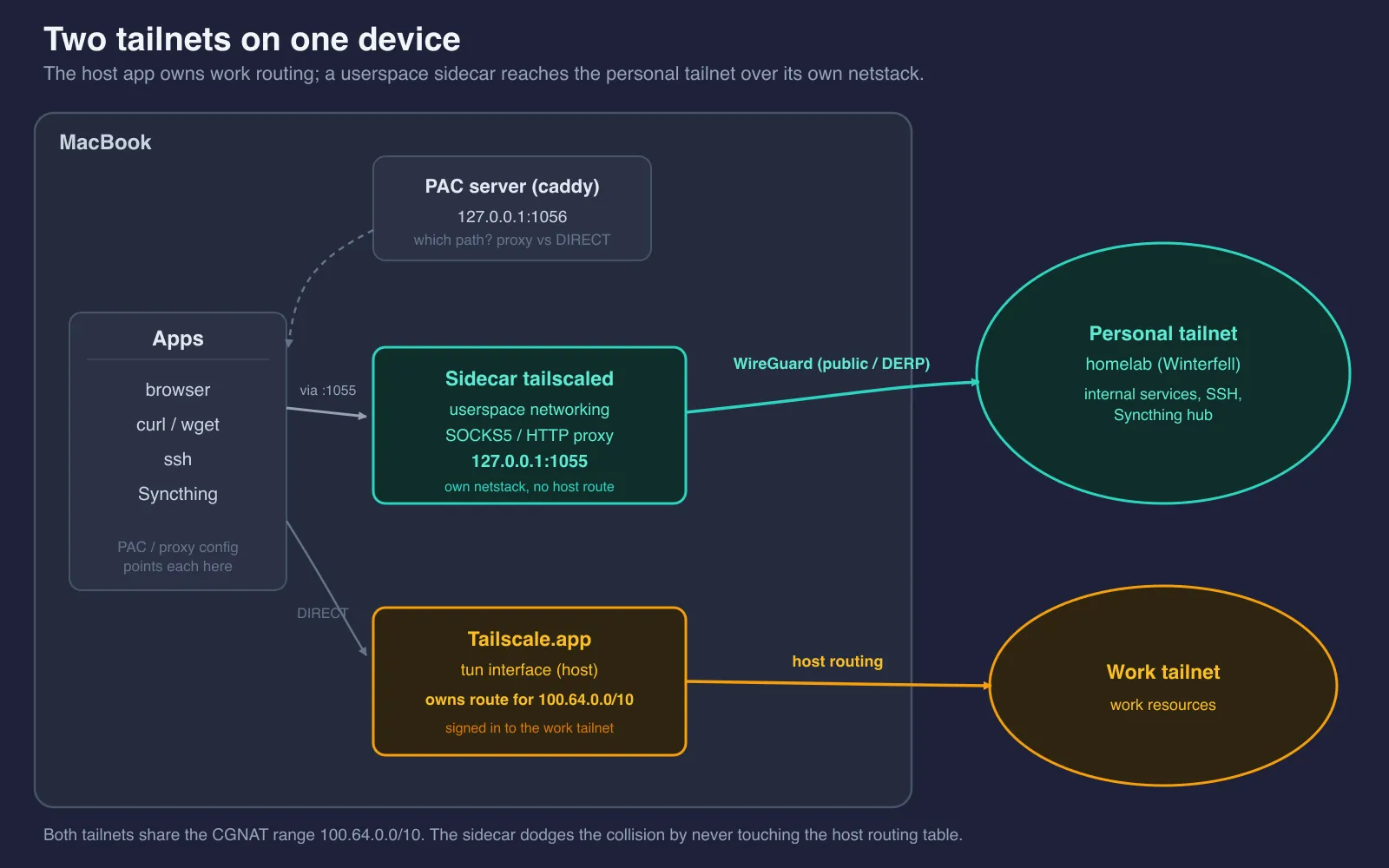
This post is my notes on how I got there. The short version: I run a second tailscaled entirely in userspace and reach my personal tailnet through a local SOCKS proxy, so the official Tailscale.app keeps owning work and nothing about the host’s networking has to change. (If you just want the configs, they’re all in this dotfiles PR .)
The Problem
The app does let me add both accounts. What it won’t do is run them together: Tailscale’s fast user switching keeps exactly one account active at a time, and switching is a real switch. The more interesting question is why it has to be that way, because the answer is what any fix has to work around.
It comes down to addressing. Every tailnet hands out node IPs from the same CGNAT range, 100.64.0.0/10, and these days those addresses are only locally unique, so two tailnets genuinely overlap inside that space. In normal mode the Tailscale client creates a utun interface and installs a single route for the whole 100.64.0.0/10 range pointing at it. The host has one routing table and keeps one route for that prefix, so all 100.x traffic can only ever go to one tailnet. The kernel has no way to know which tailnet a given 100.x belongs to. Run a second client the normal way and the two just fight over the same route.
DNS has a similar split, but it’s the part I can design around. MagicDNS only answers for the active tailnet, so personal *.ts.net names won’t resolve while work is up. I get around that by not leaning on MagicDNS for the personal side at all. My internal services live in public DNS, a Cloudflare wildcard *.internal.rajrajhans.com pointing at my homelab hub’s tailnet IP (the setup from Internal DNS for a k3s Tailscale Cluster ), which resolves the same 100.x address no matter which tailnet is active. So dawarich.internal.rajrajhans.com comes back as 100.102.29.109 perfectly fine.
That leaves routing as the real wall. The name resolves, but the host has no way to put a packet onto the other tailnet. Work owns the route for the entire 100.64.0.0/10 range, so the packet goes to the work tunnel, which has never heard of that peer, and dies.
So the fix has to reach the personal tailnet without ever installing a host route for 100.64.0.0/10.
The Solution
That’s exactly what Tailscale’s userspace networking mode is for.
I run a second tailscaled with --tun=userspace-networking. In this mode, tailscaled creates no network interface and installs no routes. Instead it keeps its own private netstack (a full TCP/IP stack living inside the process) and reaches my personal-tailnet peers directly over WireGuard, using their public or DERP endpoints.
That independence is the whole trick. Because this second daemon never asks the host to route 100.64.0.0/10, it never collides with the work tunnel that already owns that range.
So how do apps actually use it? The userspace daemon exposes a local SOCKS5 and HTTP CONNECT proxy on 127.0.0.1:1055 (the --socks5-server and --outbound-http-proxy-listen flags). Any app that can speak to a proxy hands its TCP traffic there (HTTPS, SSH, Syncthing, anything TCP), and the proxy carries it out over the personal tailnet. It’s protocol-agnostic at the TCP level.
There’s an important detail in how the lookup happens. When an app uses socks5h (the h matters) or HTTP CONNECT, it hands the proxy a hostname, not an IP, and the sidecar performs the DNS resolution and the connection on the personal-tailnet side. The local machine never has to resolve personal-tailnet names itself.
I run this sidecar as a launchd agent so it’s always on, with its own --socket and --statedir so it coexists cleanly with the official Tailscale app (and so the auth key stays out of the repo and the Nix store).
To keep the official tailscale CLI and the sidecar from talking over each other, I use a tiny wrapper script (tsidecar) that always points at the sidecar’s socket:
#!/usr/bin/env bash
exec tailscale --socket="$HOME/.local/state/tailnet-sidecar/tailscaled.sock" "$@"
That way every tsidecar command lands on the userspace daemon instead of the host one.
Authentication is a one-time, out-of-band step (I do it by hand so the key never ends up in version control):
tsidecar up --hostname=mac-tailnet-sidecarAfter that, the launchd agent’s KeepAlive takes over and restarts the sidecar if it dies or after a reboot.
One light note on plumbing: every launchd agent here (the sidecar, and the small Caddy server we’ll meet shortly) is declared via Nix and home-manager, so the whole thing is reproducible. I won’t turn this into a Nix tutorial, but that’s why you’ll see things referenced as agents rather than hand-written plists.
The Three Layers (Browser Case)
Let’s slow down on the browser case. There are three independent layers, and each answers a different question:
- PAC answers which path a request takes (proxy or DIRECT). It’s a pure hostname string match. No DNS happens here.
- DNS (Cloudflare) answers what IP the hostname maps to.
- The sidecar answers how to reach that IP.
None of them overlaps. Here’s the end-to-end flow when I open an internal service in the browser:
- The PAC script matches the hostname against
*.internal.rajrajhans.com. This is pure string matching, no DNS, and it returns “use the proxy.” - The browser hands the hostname (not an IP) to the proxy, skipping local resolution entirely.
- The sidecar does the lookup itself. The Cloudflare wildcard resolves
*.internal.rajrajhans.comto my hub’s tailnet IP (a100.xaddress). - The sidecar dials that IP over the personal tailnet’s WireGuard tunnel.
- Bytes relay back. The original URL, the
Hostheader, and the TLS SNI are all preserved, because the proxy tunnels the connection, it doesn’t rewrite it.
That last point matters more than it looks. Because the proxy tunnels rather than rewrites, the TLS handshake happens end to end between the browser and the service, SNI intact, so my wildcard cert validates exactly as it would on the tailnet directly (!!!).
Wiring Up Each Use Case
The browser is the interesting one, but the same 127.0.0.1:1055 proxy quietly powers everything else too.
Internal Web
The PAC script does one job: route *.internal.rajrajhans.com through the proxy, send everything else DIRECT.
function FindProxyForURL(url, host) {
  if (shExpMatch(host, '*.internal.rajrajhans.com')) {
    return 'PROXY 127.0.0.1:1055; SOCKS5 127.0.0.1:1055';
  }
  return 'DIRECT';
}Chrome silently ignores file:// PAC files (it doesn’t error, it just doesn’t apply them). The
fix is to serve the PAC over HTTP. I run a tiny Caddy launchd agent that serves it at
http://127.0.0.1:1056/tailnet-sidecar.pac, which also gives me a single source of truth for the
script.
Chrome and Safari pick up the PAC via the macOS system auto-proxy setting (I set the auto-proxy URL on every network service). Firefox is the exception, it doesn’t reliably follow the macOS system proxy, so I point it at the same PAC URL through a user.js in each profile.
SSH
SSH gets it through ProxyCommand in ~/.ssh/config:
ProxyCommand /usr/bin/nc -X 5 -x 127.0.0.1:1055 %h %pnc’s SOCKS5 mode (-X 5) resolves the MagicDNS name remotely, so I can ssh winterfell and have the sidecar do the lookup, no local DNS entry required.
Syncthing (the hard one)
Syncthing was the use case that didn’t fit the mold. It’s peer-to-peer, bidirectional, with its own discovery, and it leans on UDP and QUIC, none of which a one-way TCP SOCKS proxy can carry on its own.
But the topology saves me. My setup is just Mac syncing with a single always-on homelab hub (winterfell), and both are on the personal tailnet. So the Mac is always the dialer, and a single Mac-initiated TCP connection is enough to carry sync in both directions. I don’t need discovery, relays, or QUIC at all.
So I run native Syncthing (no Docker, which matters in a second) with two things set. First, the proxy:
ALL_PROXY=socks5://127.0.0.1:1055Second, a static address for the hub instead of relying on discovery:
tcp://<hub-tailnet-ip>:32000A few deliberate choices in there:
- The
tcp://prefix forces TCP, because QUIC can’t cross the SOCKS proxy. - Port
32000is the hub’s BEP (Block Exchange Protocol) port, exposed on the tailnet as a k3s NodePort. - Discovery and relays are disabled on the Mac, and the hub’s stored address for this Mac is set to dynamic, so the hub just waits for the Mac to dial in.
Running native (instead of in a container) also keeps macOS file watching working, with no VM boundary in the way.
Inside the cluster, kube-proxy SNATs the source address to the node IP. That looks alarming at first, like the hub will see the “wrong” peer. But it’s fine, because Syncthing authenticates by device ID, not source IP. The device ID survives the SNAT, so authentication still works.
CLI Tools
For one-off curl or wget against an internal host, point them at the proxy directly:
curl -x socks5h://127.0.0.1:1055 https://prometheus.internal.rajrajhans.com(Or set ALL_PROXY and skip the flag.) Note that CLI tools don’t read the macOS system PAC, so unlike the browser, you have to tell them about the proxy yourself.
Why Not Docker
I originally prototyped this as a Docker Compose stack: a tailscale container plus an ncat forwarder to expose its connectivity. It worked. I just landed somewhere simpler.
The realization was that the only thing I actually need is the SOCKS proxy. Syncthing reaches it via ALL_PROXY, internal URLs reach it via the PAC, SSH reaches it via ProxyCommand. Once that’s true, a whole container plus a forwarder is more moving parts than the job requires.
So I switched to a Nix-native launchd userspace tailscaled. It’s always on without Docker Desktop needing to be running, it’s one process instead of a stack, and it fits cleanly into an all-Nix dotfiles repo.
Wrapping Up
So, to recap: one host, two tailnets. Work stays on the official Tailscale.app and the host’s routing table. My personal tailnet runs entirely in userspace through a second tailscaled, reached through a single local SOCKS proxy. For the browser, three independent layers (PAC for the path, DNS for the IP, the sidecar for the route). For everything else, just point the tool at the proxy.
The nice part is how general this is. Anytime you need to reach a second isolated network without disturbing the host’s routing, a userspace WireGuard node plus a local proxy is a clean way to do it.
If you want the exact configs, I’ve put the whole thing (the launchd agents, the PAC, the Nix wiring) in a dotfiles PR: github.com/rajrajhans/dotfiles/pull/1 .
That’s it for this post. I hope it saves you some back-and-forth between tailnets. Thanks for reading!
References